

5. External Interrupt
5.1 What is an Interrupt
In the world of microprocessors or microcontrollers, an interrupt is a special event that interrupts and temporarily suspends the currently executing program in order to handle a specific condition or event, such as pressing a button, a timer expiring, or receiving serial port data. An interrupt is a very important concept in computer systems; it responds asynchronously to these specific situations. Here is an example: suppose we are writing code and suddenly a phone call comes in. At this point, we stop writing code and answer the phone, and after finishing the call, we continue writing code. The phone call here is equivalent to an interrupt, interrupting what we are currently doing; answering the call is equivalent to what the interrupt needs to execute, which is the interrupt service routine.
Interrupts can be divided into two types: hardware interrupts and software interrupts.
Hardware interrupts are usually triggered by physical events from external devices, such as pressing a button, a timer expiring, or data arriving at the serial port. When these events occur, the microprocessor immediately suspends its current task and jumps to a predefined interrupt service routine (ISR) to respond to the event.
Software interrupts are triggered by software instructions and are usually used for more complex processing tasks. For example, operating system system calls use software interrupts.
5.2 External Interrupt
In the previous chapter, when we did the button experiment, although we could read the GPIO input function, the code was always detecting changes in the IO input. If we add a lot of code later, it will take a long time to poll the button detection part, which is inefficient. Especially in certain specific scenarios, for example, a certain button may only be pressed once a day to perform a related function, so we waste a lot of time detecting the button in real time. To solve this problem, we introduce the concept of external interrupt. As the name implies, the related function is executed only when the button is pressed (an interrupt is generated). This greatly saves CPU resources, so interrupts are very commonly used in real projects.
An external interrupt is a type of hardware interrupt, triggered by events external to the microcontroller. Certain pins of the microcontroller are designed to respond to specific events, such as a button press, a change in a sensor signal, etc. These designated pins are usually called "external interrupt pins."
When an external interrupt event occurs, the currently executing program is immediately stopped, and the corresponding interrupt service routine (ISR) is jumped to for processing. After processing, the program returns to where it was interrupted and continues execution.
For embedded systems and real-time systems, the use of external interrupts is very important. It can help the system respond immediately to external events, greatly improving the efficiency and real-time performance of the system. The ESP32S3 dev board provides many pins as available external interrupt pins, which can be configured for external interrupt experiments.
The external interrupts of the ESP32 support rising edge, falling edge, low level, and high level trigger modes. Rising edge and falling edge triggers are as follows:
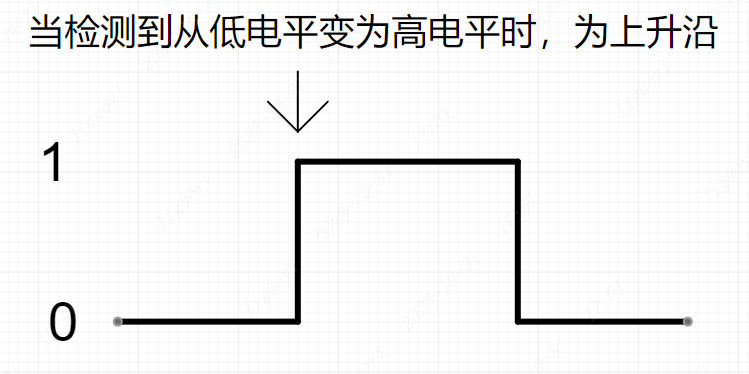
After the pin is set as an external interrupt pin, when the pin is detected to have the configured trigger mode, it will enter the interrupt callback function to execute the corresponding program;
5.3 Role and Advantages of External Interrupts
The external interrupt function of the ESP32S3 has the following roles and advantages in Arduino development:
Real-time response to external events: The external interrupt function of the ESP32S3 allows your Arduino to respond immediately when an external event trigger is detected. These external events can come from sensors, buttons, switches, received signals, and so on. Through external interrupts, you can capture these events in real time and perform corresponding operations without frequent polling or waiting.
Save computing resources: External interrupts allow you to offload the task of handling external events to the chip's hardware, thereby saving the processor's computing resources. Compared with software polling, external interrupts can reduce the burden on the processor, allowing it to use other resources more effectively for more complex tasks.
Precise event capture: The external interrupt function of the ESP32S3 can capture the trigger of external events in a very precise way. You can adapt to different external events by configuring the interrupt trigger method (such as rising edge, falling edge, any level, low level hold, high level hold, etc.), and immediately interrupt the current program execution when an event occurs, switching to execute the interrupt service function (ISR).
High-priority handling: External interrupts can be set to high-priority handling, taking priority over the currently executing program. This is very useful for important events that require immediate response, such as emergency notifications, sensor detection, etc. When an external event is triggered, the processor immediately switches to execute the interrupt service function, ensuring timely and accurate handling of related operations and avoiding delays in the handler.
Multi-channel interrupt handling: The ESP32S3 supports multiple external interrupts. You can connect multiple external events to different interrupt pins, thereby achieving parallel processing of multiple events. This allows you to handle multiple sensors, switches, and other external events on one Arduino, improving the flexibility and scalability of the system.
In summary, the external interrupt function of the ESP32S3 provides advantages such as real-time response, saving computing resources, precise event capture, high-priority handling, and multi-channel interrupt handling for your Arduino projects. It provides us with a more flexible and efficient way to handle external events, and helps build more powerful and reliable applications.
5.4 Process of Using External Interrupts
The process of using external interrupts generally follows these steps:
- Import the relevant modules and libraries
from machine import Pin- Configure the pin as input or input mode with pull-up resistor enabled
Use the Pin method to configure the pin as an input pin.
# Initialize GPIO0 pin as input mode, enable the pull-up resistor
KEY = Pin(0, Pin.IN, Pin.PULL_UP)- Bind the interrupt service routine to the pin and set the interrupt trigger mode
- Use the .irq() method to bind the interrupt service routine to the pin. You can choose the interrupt trigger mode, such as rising edge, falling edge, or state change:
# Bind the interrupt service function, falling edge trigger, the interrupt service function is key_handler
KEY.irq(key_handler, Pin.IRQ_FALLING)Where the .irq() method is part of the machine Pin class and is used to bind a function (interrupt service routine ISR) to an external interrupt pin. When the external interrupt pin meets the specified condition (such as a pin level change), the corresponding interrupt service routine will be automatically called. This function is most commonly used in handling real-time operations and interrupt events.
The function prototype is as follows:
Pin.irq(handler=None, trigger=Pin.IRQ_FALLING | Pin.IRQ_RISING, *, priority=1, wake=None, hard=False)The following is a description of each parameter:
- handler: This parameter accepts a callback function that will be called when the interrupt is triggered. If set to None, the previously configured interrupt is disabled.
- trigger: This parameter defines the interrupt trigger condition. It can be one or a combination (via logical OR operations) of the following types:
- Pin.IRQ_FALLING: Configured to trigger an interrupt on the falling edge of the signal.
- Pin.IRQ_RISING: Configured to trigger an interrupt on the rising edge of the signal.
- Pin.IRQ_LOW_LEVEL: Configured to trigger an interrupt when the signal is at a low level.
- Pin.IRQ_HIGH_LEVEL: Configured to trigger an interrupt when the signal is at a high level.
- priority: Sets the interrupt priority. This parameter may not always be effective on certain devices because it depends on the hardware platform and MicroPython port support. The priority setting depends on the specific implementation of the platform and port.
- wake: On some devices, this parameter can be set as a way to wake the device from sleep mode. For example, ESP32 supports setting it to modes such as machine.SLEEP and machine.IDLE to wake the device from light sleep or idle mode.
- hard: A boolean parameter used to specify whether to use a hardware interrupt. Again, this feature depends on whether the MicroPython port for the specific platform supports it. When using Pin.irq, it is common practice to provide an interrupt trigger condition (trigger) and a callback function (handler). For example:
from machine import Pin

def callback(p):
    print("Interrupt detected on pin: ",p)

pin=Pin(15,Pin.IN,Pin.PULL_UP)

interrupt=pin.irq(trigger=Pin.IRQ_RISING|Pin.IRQ_FALLING,handler=callback)This code snippet sets up a callback function that will be called when any edge change (rising or falling) is detected on the pin connected to GPIO 15.
- Handle interrupt events The following uses the interrupt callback function
callbackused in the above example for explanation.
The code executed in the interrupt handler will be called when the interrupt is raised. You can implement the specific interrupt response logic inside it.
Optional step: When necessary, you can disable the interrupt or reassign the interrupt handler within the interrupt handler function.
For example:
def callback(pin):
    # Code to execute when the interrupt is raised
    ...

    # Disable the interrupt
    pin.irq(handler=None)

    # Reassign the interrupt handler
pin.irq(handler=callback, trigger=machine.Pin.IRQ_FALLING)Notes:
- In MicroPython, the available range of external interrupt pins depends on the specific hardware pins of the ESP32 dev board.
- You need to select the appropriate interrupt trigger condition according to your specific needs and pin configuration, such as machine.Pin.IRQ_FALLING (falling edge trigger) or machine.Pin.IRQ_RISING (rising edge trigger).
5.5 External Interrupt Verification
The example is the same as the previous chapter, but the trigger method and the content to be executed after triggering are executed through an interrupt.
from machine import Pin
import time

# Initialize GPIO48 pin as output mode
LED=Pin(48,Pin.OUT)
# Initialize GPIO0 pin as input mode, enable the pull-up resistor
KEY=Pin(0,Pin.IN,Pin.PULL_UP)

# Define the external interrupt service function
def key_handler(key):
    # Debounce
    time.sleep_ms(10)
    # If the button is pressed
    if KEY.value()==0:
        # Invert the LED state
        LED.value(not LED.value())

# Bind the interrupt service function, falling edge trigger, the interrupt service function is key_handler
KEY.irq(key_handler, Pin.IRQ_FALLING)

while True:
time.sleep_ms(10)5.6 External Interrupt Effect
Press the button to turn the LED on, press the button again to turn the LED off, and repeat.