

2. MicroPython Basics
MicroPython Documentation: http://micropython.86x.net/en/latet/esp32/quickref.html#
MicroPython is a lean and efficient implementation of the Python3 programming language. Its syntax is consistent with Python3, but it only implements a small portion of the Python standard library and is optimized to run in resource-constrained environments such as MCUs and Wi-Fi SoCs. Therefore, we need to understand its syntax before using MicroPython.
2.1 Comments
In Python, "#" is used for single-line comments, and three single quotes '''...''' or three double quotes """...""" are used for multi-line comments. Comments are very important for code readability and maintenance.
# This is a single-line comment

'''
This is a multi-line comment
'''
"""
This is also a multi-line comment
"""Note that in MicroPython there is no need to add a semicolon at the end of a statement.
2.2 Operators
Arithmetic (mathematical) operators:
In the table below, a=10 and b=5.
| Operator | Description | Example |
|---|---|---|
| + | Add | Adds two objects: a+b, result=15 |
| - | Subtract | Gets a negative number or subtracts one number from another: a-b, result=5 |
| * | Multiply | Multiplies two numbers: a*b, result=50 |
| / | Divide | a/b = 10/5 = 2 |
| // | Floor divide | Returns the integer part of the quotient: 9//2, result=4 |
| % | Modulo | Returns the remainder of a division: b%a, result=5 |
| ** | Exponent | a**b is 10 to the power of 5, result=100000 |
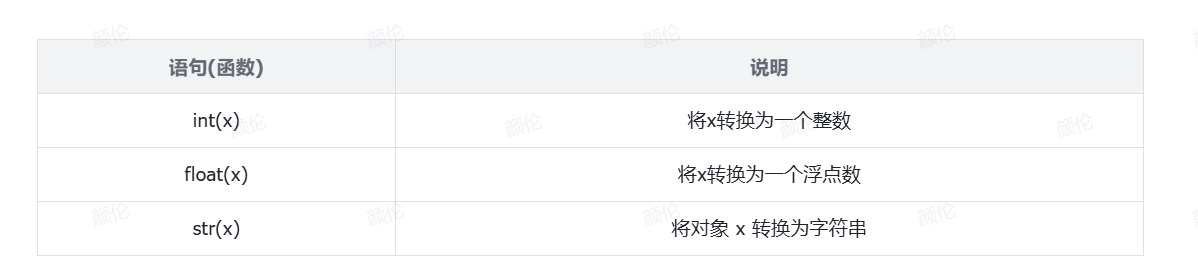
2.3 Data Type Conversion
2.4 Strings
There are three ways to define a string -> single-quote definition; double-quote definition; triple-quote definition; Among them, the single-quote definition can contain double quotes; the double-quote definition can contain single quotes; and you can use the escape character (\) to remove the effect of the quotes and turn them into a normal string.
name = 'LCSC-Openkits(LCKFB)'      # Single-quote definition
name = "LCSC-Openkits(LCKFB)"      # Double-quote definition
name = """LCSC-Openkits(LCKFB)""" # Triple-quote definition2.4.1 String Concatenation
name = 'LCKFB'
print("hello " + name)Note: strings cannot be concatenated with non-string variables.
name = 'LCKFB'
print("hello " + name, end='')By default, the print statement automatically adds a newline. To output without a newline, add end='' to the print statement.
The print() function can be used to print data to the terminal.
2.4.2 String Formatting
We can use the following syntax to quickly concatenate strings and variables.
The following code uses placeholders for three different types of variables: string, integer, and float.
name = "Zhang San"
age = 18
weight = 140.54
message = "My name is %s, I am %d years old, and I weigh %f jin" % (name, age, weight)
print(message)Note: This syntax does not control precision or check the type.
2.5 Conditional Statements
Basic format of the if statement:
if age >= 18:
print("You are an adult")The code block belonging to the if condition must be indented with 4 spaces at the front.
Python determines the scope of a code block through indentation.
if...else statement format
if age >= 18:
    print("Your age is greater than or equal to 18")
elif age > 10:
    print("Your age is greater than 10 and less than 18")
else:
print("Your age is less than or equal to 10")2.6 Loop Statements
2.6.1 while Loop
i = 0
while i < 10:
    print("i = %d" % i)
i += 12.6.2 for Loop
 name = "LCKFB"
for x in name:
print(x)Syntax 1: range(num)
The range statement is used to obtain a sequence of numbers. It means starting from 0 up to num (not including num itself).
for x in range(5):
print(x)Syntax 2: range(num1, num2)
for x in range(5, 10):
print(x)This means starting from num1 up to num2 (not including num2 itself).
2.7 Functions
A function is an organized, reusable piece of code that implements a specific feature. Function definition:
def function_name(parameters):
    function body
return return_valueNote: If a function does not use a return statement to return data, it returns the literal None; in conditional statements, None is equivalent to False; when defining a variable that temporarily does not need a specific value, you can use None instead.
Using the global keyword, you can declare a variable as a global variable inside a function, which is equivalent to static in C language.
def test():
    global num
    num = 200
print(num)2.8 Classes and Inheritance
In Python, you can implement object-oriented programming by defining classes. A class contains data and functions: data is stored in the class's attributes, while functions are stored in the class's methods. By creating a class, you can generate multiple objects of the same type (or a parent class) that share the same attributes and methods.
Inheritance means that a class can derive a subclass, and the subclass inherits the attributes and methods of the parent class. A subclass can further override the methods of the parent class or add new attributes and methods, thereby extending the parent class.
- Define a class:
Use the class keyword to define a class, and use a code block to write the attributes and methods of the class. For example:
class MyClass:
    def __init__(self, param):
        self.param = param

    def method(self):
        # Method implementation
pass- Instantiate an object:
By calling the class's constructor, you can create an instance (object) of the class. For example:
my_object = MyClass("value")- Access attributes and call methods:
Use the object name followed by . to access the object's attributes and methods. For example:
value = my_object.param
my_object.method()- Inheritance:
In MicroPython, you can use inheritance to create a class that inherits attributes and methods from another class. Through inheritance, a subclass can acquire the features of the parent class and add its own specific functionality. For example:
class ChildClass(MyClass):
    def __init__(self, param, child_param):
        super().__init__(param)
        self.child_param = child_param

    def child_method(self):
        # Subclass method implementation
passIn the example above, ChildClass inherits from MyClass and adds its own attributes and methods. super().__init__(param) calls the constructor of the parent class.
- Multiple inheritance: MicroPython supports multiple inheritance, that is, a class can inherit from more than one parent class. Multiple inheritance can be implemented by listing multiple parent classes in the class definition. For example:
class ChildClass(ParentClass1, ParentClass2): # class definition
passThese are the basic usages of classes and inheritance in MicroPython. Classes and inheritance are core concepts of object-oriented programming. They can help you organize and abstract code, and achieve code reuse and extensibility.