6. Serial Communication
6.1 Introduction to Serial Communication
A serial port is a communication method that transmits data bit by bit between peripherals and a processor through data signal lines, ground lines, and control lines. Although the transmission speed is lower than parallel transmission, a serial port can use one line to send data while using another line to receive data. This communication method uses fewer data lines and can save communication costs in long-distance communication. The most important parameters of serial communication are the baud rate, data bits, stop bits, and parity bit. These parameters must be consistent between the two communication ports.
6.2 Introduction to Serial Communication Parameters
Serial communication parameters include baud rate, data bits, parity bits, stop bits, etc. These parameters describe the basic specifications of the transmitted data. For example, the baud rate defines the rate of data transmission, the data bits determine the number of bits contained in each data byte, the parity bit is used for error detection of data, and the stop bit indicates the end of data transmission.
- Baud rate: A parameter that measures the communication speed. It represents the number of bits transmitted per second.
- Data bits: A parameter that measures the actual data bits in communication. It represents the number of data bits contained in one information packet.
- Stop bit: Used to represent the last bit of a single information packet. Typical values are 1, 1.5, and 2 bits. Since data is transmitted on the transmission line and each device has its own clock, asynchrony may occur during communication. The stop bit not only indicates the end of transmission but also provides an opportunity to correct clock synchronization. The more stop bits there are, the greater the tolerance for different clock synchronization, but the slower the data transmission rate.
- Parity bit: Represents a simple way of error checking.
For a more detailed introduction, please search on Baidu.
6.3 Serial Operating Modes
Serial operating modes are divided into three types: simplex, full-duplex, and half-duplex.
- Simplex: At any moment during communication, information can only be transmitted from A to B, or from B to A;
- Half-duplex: At any moment during communication, information can be transmitted from A to B and from B to A, but only one direction of transmission can exist at the same time;
- Full-duplex: At any moment during communication, there are bidirectional signal transmissions from A to B and from B to A on the communication line;
6.4 Serial Communication Protocol
The serial communication protocol defines the rules and format of data exchange on the serial port. Common serial communication protocols include the ASCII protocol, Modbus protocol, RS-232 protocol, etc. The protocol specifies the frame structure, data format, checksum method, etc., ensuring that the sending and receiving parties exchange data according to the same rules, thereby achieving correct transmission and parsing of data.
Serial communication transmits bit by bit. Each character transmission always starts with a start bit and ends with a stop bit, with no fixed time interval required between characters. Each character is preceded by one start bit (low level), followed by 7 data bits, then one parity bit, and finally the stop bit. After the stop bit comes an idle bit of variable length. Both the stop bit and the idle bit are specified as high level.
6.5 Role and Advantages of Serial Communication
The serial port is one of the most common communication interfaces between computers and external devices, and it has an important role and wide application. In the computer field, the importance of the serial port is reflected in the following aspects:
- Data transmission: The serial port is a commonly used data transmission interface. Through the serial port, computers can exchange data and communicate with various external devices. Whether it is sensors, actuators, displays, printers, or other external devices, serial communication can achieve data transmission and control.
- Remote control and monitoring: Serial communication is widely used in the field of remote control and monitoring. Through the serial port, computers can remotely control the actions of devices and monitor device status and data information in real time. This plays an important role in industrial control, automation systems, remote monitoring, and other scenarios.
- Debugging and troubleshooting: Serial communication is an important tool for debugging and troubleshooting. Through the serial port, computers can communicate with embedded systems, microcontrollers, etc., monitor and debug programs in real time, output debug information, perform error location and troubleshooting, and perform status monitoring and fault diagnosis of the system.
- Hardware connection: The serial port can serve as a connection bridge between the computer and various external devices. Through the serial port, you can connect and control various external devices such as sensors, actuators, and peripherals. The serial port can provide stable data transmission and bidirectional communication functions.
- Communication protocol: The serial communication protocol is the specification and agreement for data transmission between the computer and external devices. By defining different protocols, data interaction and communication between different devices can be achieved. Common serial communication protocols include UART, RS-232, RS-485, etc.
In summary, the serial port plays an important role in communication between computers and external devices. It is a key tool for data transmission, remote control and monitoring, debugging and troubleshooting, and is the bridge for computer-to-external-device connection and communication. Through serial communication, data interaction with various external devices can be achieved, improving the functionality and performance of the system. Specifically, the roles and advantages of serial communication can be summarized as follows:
- Data transmission: Serial communication can achieve reliable bidirectional data transmission, including sending and receiving various types of data.
- Remote control and monitoring: Through serial communication, remote control of device actions can be achieved, and device status and data information can be monitored in real time.
- Debugging and troubleshooting: Serial communication is an important tool for debugging and troubleshooting, allowing real-time monitoring and debugging of programs, output of debug information, and error location and troubleshooting.
- Flexibility and real-time performance: Serial communication has high flexibility and real-time performance, allowing baud rate and parameters to be adjusted according to needs, and timely processing of data and response to external events.
- Cost-effectiveness: Serial communication uses simple and inexpensive hardware and is widely used in various fields, making it an economical and practical communication method.
In summary, serial communication has important roles and many advantages in data transmission, remote control and monitoring, debugging and troubleshooting, etc. It is an important means of achieving data interaction between devices and system functions.
6.6 Serial Communication Schematic
The ESP32S3 has three serial ports, namely UART0, UART1, and UART2. Among them, serial port 0 of the dev board is already used for automatic download and debugging, so it is not recommended to use serial port 0 to communicate with other devices in actual applications.
We can use UART1 (serial port 1) and UART2 (serial port 2) to communicate with external serial devices. Except for serial port 0, the serial port pins can use any GPIO as communication pins, just like other peripherals.
6.7 Serial Communication Driving Process
In MicroPython, the process of using ESP32 for serial communication is as follows:
- Import the relevant modules and libraries
import machine- Initialize the serial object
uart = machine.UART(uart_number, baudrate=baudrate)Where uart_number is the UART serial port number you want to use, for example, 1 represents UART1, 2 represents UART2, and so on. baudrate is the serial baud rate, which specifies the communication rate. Other keyword-only arguments supported by the port include:
- tx specifies the TX pin to use.
- rx specifies the RX pin to use.
- For example:
# Initialize serial port 1 with baud rate 115200, TX pin is GPIO10, RX pin is GPIO9
uart1 = UART(1, baudrate=115200, tx=10, rx=9)- Use the write() method to send data to the serial port
uart.write(data)Where data is the data to be sent, which can be a string or byte data.
- Use the read() method to receive data from the serial port
data = uart.read(size)Where size is the number of bytes of data to receive.
A complete serial communication example code is as follows:
import machine

uart = machine.UART(1, baudrate=115200, tx=10, rx=9)

# Send data
uart.write("Hello, UART!")

# Receive data
data = uart.read(10)

print(data)In the above example, we initialized the UART1 interface, set the baud rate to 115200, the TXD pin to GPIO10, and the RXD pin to GPIO9. Then, we used the write() method to send the string "Hello, UART!" to the serial port. After that, we used the read() method to read 10 bytes of data and printed it out. For other detailed information about the serial port, please refer to the official MicroPython documentation:
http://www.86x.org/en/latet/library/machine.UART.html
6.8 Hardware Connection and Preparation
This case uses the commonly used CH340 module to connect the dev board and the computer to test the serial communication function.
CH340 is a USB-to-serial chip commonly used for USB-to-serial functions of microcontrollers, MCUs, and Arduinos, and can also be used for USB data sending and receiving. When using the CH340 module, the corresponding driver needs to be installed so that the computer can recognize the serial output of the CH340 chip. For Windows systems, the driver is usually installed automatically; for Mac and Linux systems, the corresponding driver support needs to be downloaded and installed before use.
CH340 Driver Download
Download Center (click to jump)
Under Download Center -> Beginner Guide Materials (Baidu Netdisk) -> Chapter 05 Development Tools -> CH340 Driver.zip
The CH340 module is quite convenient to use. After connecting the computer and the dev board, you only need to send instructions through the serial port to achieve communication with the microcontroller. Its advantages include a simple interface, low price, and easy-to-use drivers, so it is widely used in the development process and various projects that need to communicate with a computer.
The physical connection is shown in the following figure: 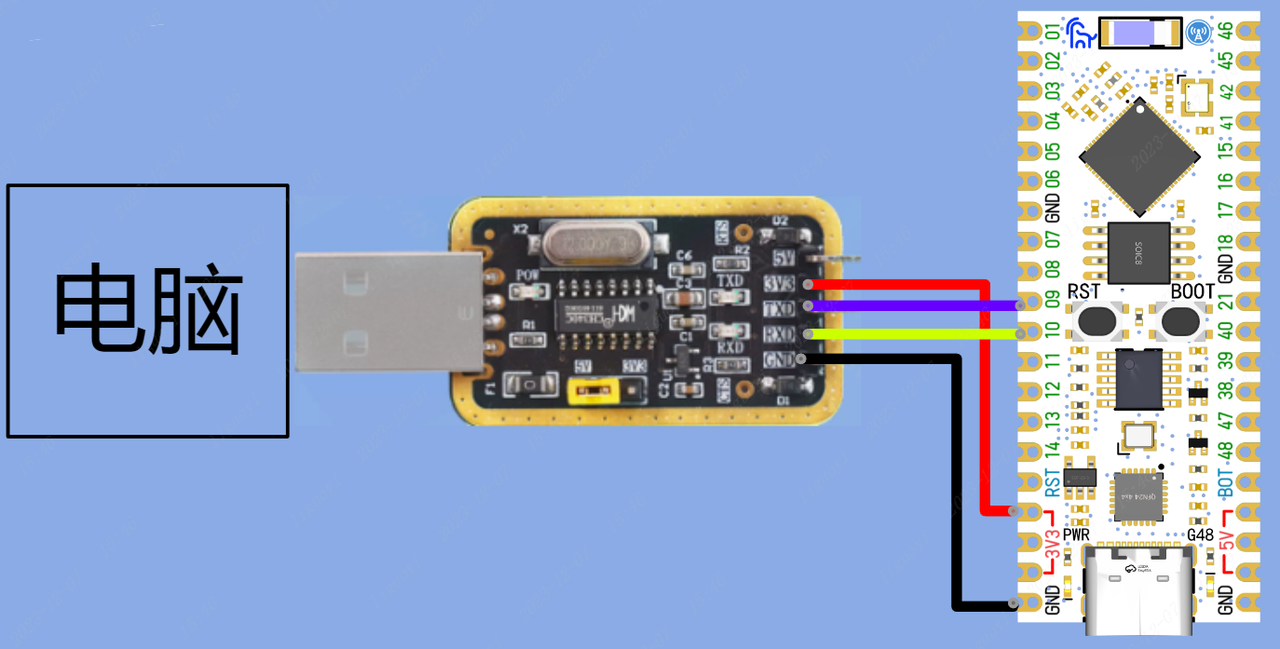
6.9 Serial Communication Verification
from machine import UART
import time

# Initialize serial port 1 with baud rate 115200, TX pin is GPIO10, RX pin is GPIO9
uart1 = UART(1, baudrate=115200, tx=10, rx=9)

while True:
    # Send string through serial port 1
    uart1.write('Hello World!\r\n')
    # Read the amount of data received by serial port 1; if not 0, it means data has been received
    while(uart1.any()):
        # Read the data in the serial port and save it to data
        data = uart1.read()
        # Output the value received by the serial port through the IDE debugger
        print(data)
time.sleep_ms(1000)6.10 Serial Communication Effect
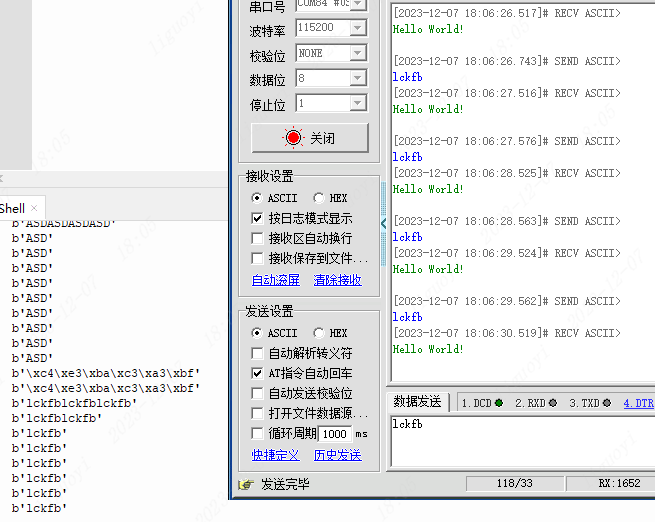
After the dev board is powered on, it outputs "Hello World" through serial port 1, and then serial port 0 and serial port 1 can send data to each other.