


杂项设备属于特殊的一种字符型设备,是对字符设备的一种封装,为最简单的字符设备。为什么从字符设备中单独提取出了杂项设备呢?杂项设备又要如何进行使用呢?
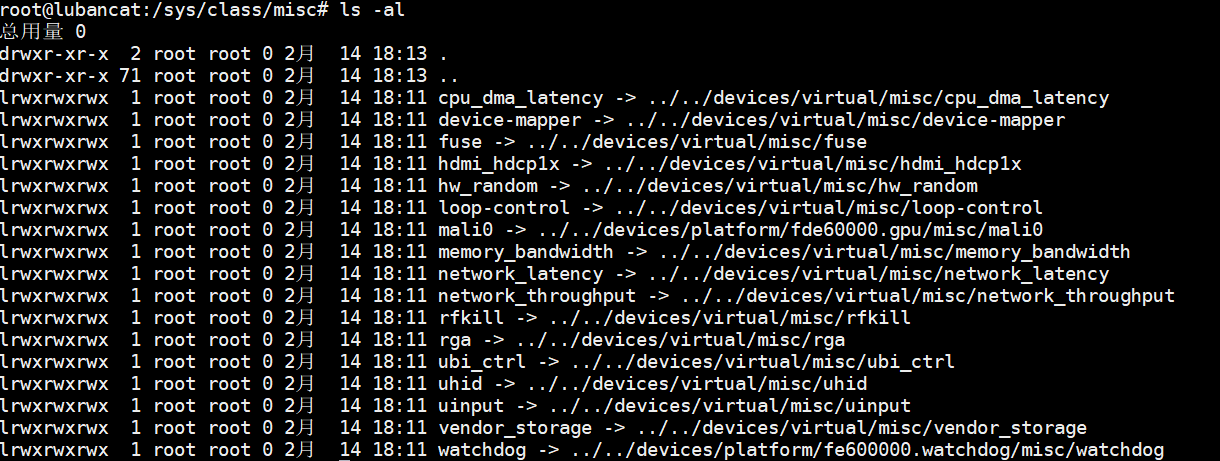
一、杂项设备节点

二、什么是杂项设备驱动
在 Linux 系统中,杂项设备是一种处理特殊设备的通用方案。相比普通字符设备,它主要有两大优势:
- 设备号分配更高效:杂项设备统一使用主设备号 10,无需像普通字符设备那样每次申请新主号。
- 开发更省事:普通字符设备需要单独注册驱动、创建设备类别并生成
/dev设备节点。而杂项设备只需把基本信息填入结构体,调用misc_register()函数即可快速完成注册。
在驱动程序中,我们使用 miscdevice 结构体来描述辅助设备:
c
struct miscdevice {
    int minor;
    const char *name;
    const struct file_operations *fops;
    struct list_head list;
    struct device *parent;
    struct device *this_device;
    const struct attribute_group **groups;
    const char *nodename;
    umode_t mode;
};定义一个 misc 设备时,需要设置三个关键参数:
- 次设备号(minor):可以选择系统预定义好的设备号,也可以自己选一个未被占用的数字。最简单的方式是填
MISC_DYNAMIC_MINOR,这样系统会自动帮你分配。 - 设备名称(name):这个名字决定了设备驱动注册成功后,在
/dev目录下会生成一个同名的设备文件。 - 操作函数集合(fops):指向一个操作函数表(
file_operations结构体),里面包含驱动的具体功能。
三、杂项设备的注册和卸载
杂项设备的注册和卸载比字符设备简单很多。
杂项设备注册函数:
c
int misc_register(struct miscdevice *misc);功能说明:该函数用于向系统注册一个杂项设备。具体操作包括:创建设备节点、将设备信息添加到系统管理列表中、完成设备在 Linux 设备模型中的初始化工作。成功返回 0,失败返回负数。
杂项设备注销函数:
c
int misc_deregister(struct miscdevice *misc);四、misc_register 实现
misc_register 与 device_create 的底层逻辑是一样的:
c
int misc_register(struct miscdevice *misc)
{
    dev_t dev;
    int err = 0;
    bool is_dynamic = (misc->minor == MISC_DYNAMIC_MINOR);

    INIT_LIST_HEAD(&misc->list);
    mutex_lock(&misc_mtx);

    if (is_dynamic) {
        int i = find_first_zero_bit(misc_minors, DYNAMIC_MINORS);
        if (i >= DYNAMIC_MINORS) {
            err = -EBUSY;
            goto out;
        }
        misc->minor = DYNAMIC_MINORS - i - 1;
        set_bit(i, misc_minors);
    } else {
        struct miscdevice *c;
        list_for_each_entry(c, &misc_list, list) {
            if (c->minor == misc->minor) {
                err = -EBUSY;
                goto out;
            }
        }
    }

    dev = MKDEV(MISC_MAJOR, misc->minor);

    misc->this_device =
        device_create_with_groups(misc_class, misc->parent, dev,
                                  misc, misc->groups, "%s", misc->name);
    if (IS_ERR(misc->this_device)) {
        if (is_dynamic) {
            int i = DYNAMIC_MINORS - misc->minor - 1;
            if (i < DYNAMIC_MINORS && i >= 0)
                clear_bit(i, misc_minors);
            misc->minor = MISC_DYNAMIC_MINOR;
        }
        err = PTR_ERR(misc->this_device);
        goto out;
    }

    list_add(&misc->list, &misc_list);
out:
    mutex_unlock(&misc_mtx);
    return err;
}五、使用案例
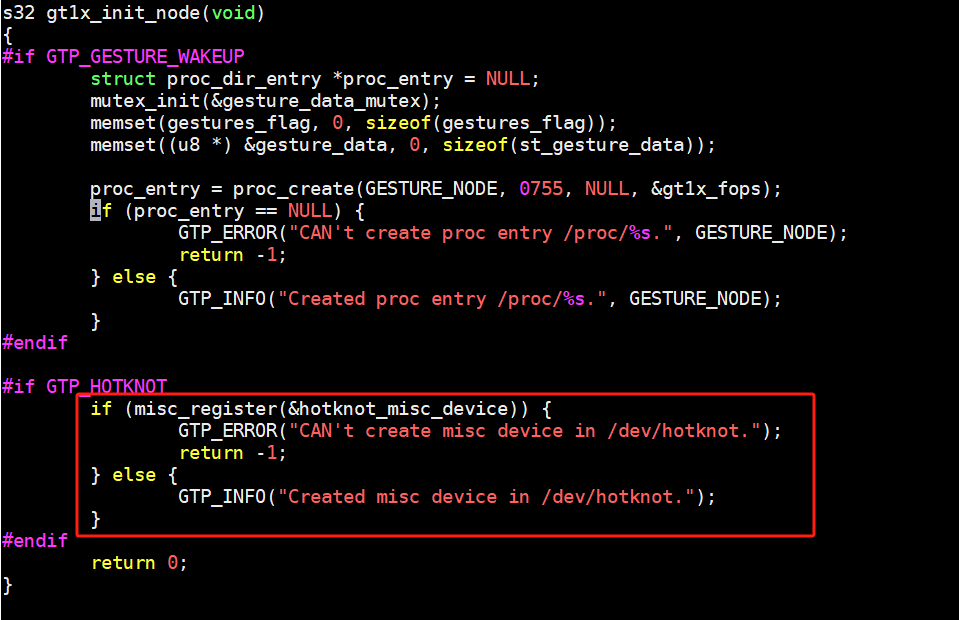
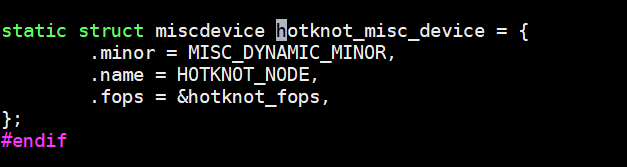
六、实验代码
源代码下载
bash
git clone git@gitee.com:yangxuesong314/linux-driver.git- 代码位于:
linux-driver/05.字符设备驱动模型/07.杂项设备
c
#include <linux/init.h>
#include <linux/module.h>
#include <linux/miscdevice.h>
#include <linux/fs.h>
#include <linux/uaccess.h>

static ssize_t cdev_test_write(struct file *file, const char __user *buf, size_t size, loff_t *off)
{
    char kbuf[32] = {0};
    if (copy_from_user(kbuf, buf, size) != 0) {
        printk("copy_from_user error\r\n");//打印copy_from_user函数执行失败
        return -1;
    }
    printk("This is cdev_test_write\r\n");
    printk("kbuf is %s\r\n", kbuf);
    return 0;
}

static ssize_t cdev_test_read(struct file *file, char __user *buf, size_t size, loff_t *off)
{
    char kbuf[32] = "This is cdev_test_read!";
    if (copy_to_user(buf, kbuf, strlen(kbuf)) != 0) {
        printk("copy_to_user error\r\n"); //打印copy_to_user函数执行失败
        return -1;
    }
    printk("This is cdev_test_read\r\n");
    return 0;
}

struct file_operations misc_fops = {
    .owner = THIS_MODULE,
    .read  = cdev_test_read,
    .write = cdev_test_write,
};

struct miscdevice misc_dev = {
    .minor = MISC_DYNAMIC_MINOR,
    .name  = "miscdriver",
    .fops  = &misc_fops,
};

static int __init misc_init(void)
{
    int ret;
    ret = misc_register(&misc_dev);
    if (ret < 0) {
        printk("misc registe is error \n"); //打印注册杂项设备失败
    }
    printk("misc registe is succeed \n");//打印注册杂项设备成功
    return 0;
}

static void __exit misc_exit(void)
{
    misc_deregister(&misc_dev);
    printk(" misc goodbye! \n");
}

module_init(misc_init);
module_exit(misc_exit);
MODULE_LICENSE("GPL");七、运行结果

驱动加载成功之后会生成 /dev/test 设备驱动文件,输入以下命令查看杂项设备的主次设备号:

从上图可以看出,/dev/test 这个杂项设备的主设备号为 10,次设备号为 61。