


内核空间和用户空间的内存是不能互相访问的。但是很多应用程序都需要和内核进行数据的交换,例如应用程序使用 read 函数从驱动中读取数据,使用 write 函数向驱动中写数据,上述功能就需要使用 copy_from_user 和 copy_to_user 两个函数来完成。这俩个函数定义在了 kernel/include/linux/uaccess.h 文件下。
一、API
1、copy_to_user
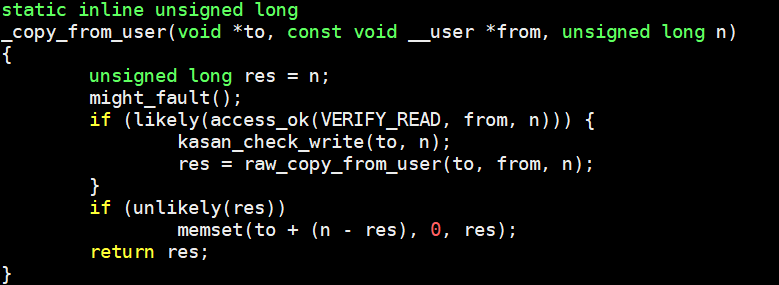
函数定义:copy_to_user() 函数用于将内核中的数据复制到用户程序的内存区域。
参数说明:
to:目标地址,是应用程序内存中的一个位置。from:源地址,是内核内存中需要拷贝的数据位置。n:要拷贝的数据量,单位是字节。
2、copy_from_user
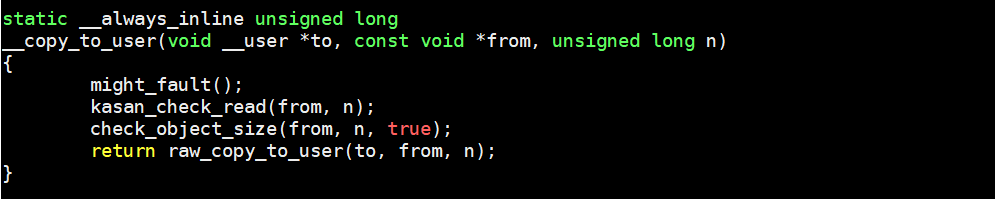
函数定义:将用户程序中的数据复制到操作系统内核的内存区域。
参数说明:
to:内核内存的地址,数据会被复制到这里。from:用户程序内存的地址,数据来源。n:需要复制的数据大小(单位为字节)。
二、实验程序
源代码下载
bash
git clone git@gitee.com:yangxuesong314/linux-driver.git- 代码位于:
linux-driver/05.字符设备驱动模型/05.用户空间和内核空间数据交换
c
#include <linux/init.h>
#include <linux/module.h>
#include <linux/kdev_t.h>
#include <linux/fs.h>
#include <linux/cdev.h>
#include <linux/uaccess.h>

static dev_t dev_num;
static int major = 0;
static int minor = 0;
struct cdev cdev_test;

struct class *class;
struct device *device;

/* 打开设备函数 */
static int cdev_test_open(struct inode *inode, struct file *file)
{
    printk("This is cdev_test_open\r\n");
    return 0;
}

/* 向设备写入数据函数 */
static ssize_t cdev_test_write(struct file *file, const char __user *buf, size_t size, loff_t *off)
{
    char kbuf[32] = {0};
    if (copy_from_user(kbuf, buf, size) != 0) { // copy_from_user:用户空间向内核空间传数据
        printk("copy_from_user error\r\n");//打印copy_from_user函数执行失败
        return -1;
    }
    printk("This is cdev_test_write\r\n");
    printk("kbuf is %s\r\n", kbuf);
    return 0;
}

/* 从设备读取数据 */
static ssize_t cdev_test_read(struct file *file, char __user *buf, size_t size, loff_t *off)
{
    char kbuf[32] = "This is cdev_test_read!";
    if (copy_to_user(buf, kbuf, strlen(kbuf)) != 0) { // copy_to_user:内核空间向用户空间传数据
        printk("copy_to_user error\r\n"); //打印copy_to_user函数执行失败
        return -1;
    }
    printk("This is cdev_test_read\r\n");
    return 0;
}

static int cdev_test_release(struct inode *inode, struct file *file)
{
    printk("This is cdev_test_release\r\n");
    return 0;
}

struct file_operations cdev_test_fops = {
    .owner   = THIS_MODULE,
    .open    = cdev_test_open,
    .read    = cdev_test_read,
    .write   = cdev_test_write,
    .release = cdev_test_release,
};

static int __init chr_fops_init(void)
{
    int ret;
    ret = alloc_chrdev_region(&dev_num, 0, 1, "alloc_name");
    if (ret < 0) {
        printk("alloc_chrdev_region is error\n");//打印动态分配设备号失败
    }
    printk("alloc_chrdev_region is ok\n");

    major = MAJOR(dev_num);
    minor = MINOR(dev_num);
    printk("major is %d \r\n", major); //打印主设备号
    printk("minor is %d \r\n", minor); //打印次设备号

    cdev_test.owner = THIS_MODULE;
    cdev_init(&cdev_test, &cdev_test_fops);
    cdev_add(&cdev_test, dev_num, 1);

    class = class_create(THIS_MODULE, "test");
    device = device_create(class, NULL, dev_num, NULL, "test");

    return 0;
}

static void __exit chr_fops_exit(void)
{
    unregister_chrdev_region(dev_num, 1);
    cdev_del(&cdev_test);
    device_destroy(class, dev_num);
    class_destroy(class);
}

module_init(chr_fops_init);
module_exit(chr_fops_exit);
MODULE_LICENSE("GPL v2");应用代码:
c
#include <stdio.h>
#include <sys/types.h>
#include <sys/stat.h>
#include <fcntl.h>
#include <unistd.h>

int main(int argc, char *argv[])
{
    int fd;
    char buf1[32] = {0};
    char buf2[32] = "nihao";
    fd = open("/dev/test", O_RDWR);
    if (fd < 0) {
        perror("open error \n");
        return fd;
    }
    read(fd, buf1, sizeof(buf1));
    printf("buf1 is %s \r\n", buf1); //打印读取的数据

    write(fd, buf2, sizeof(buf2));
    close(fd);
    return 0;
}三、实验
