


📢本篇将介绍通过OF函数获取属性。
of相关函数:kernel/include/linux/of.h
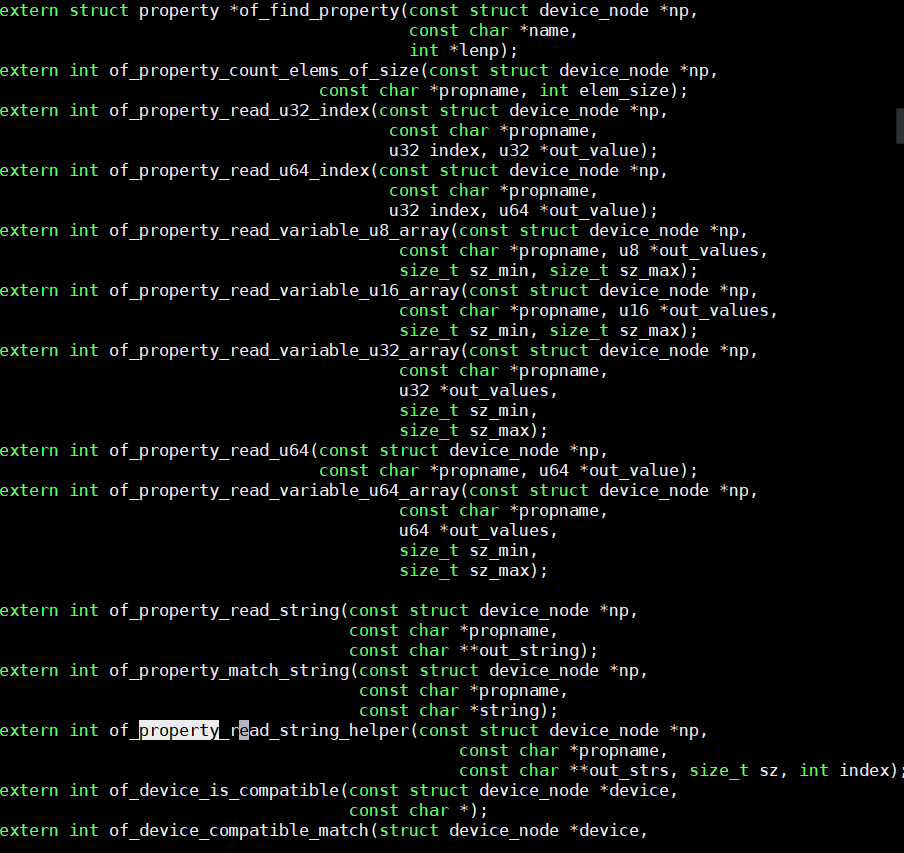
一、获取获取属性
① of_find_property 函数
在设备树中查找某个节点下指定名称的属性。如果找到,返回该属性的指针,后续可用它获取属性值或属性长度等信息。
② of_property_count_elems_of_size 函数
在设备树中查找指定名称的属性,并计算该属性包含的元素数量。例如,可以统计一个整数数组中有多少个数,或字符串列表中有多少个条目。
③ of_property_read_u32_index 函数
根据属性名查找设备树中的属性,读取指定位置(索引)的32位整数值。例如,读取数组中第2个元素的数值。
④ of_property_read_u64_index 函数
类似 of_property_read_u32_index,但读取的是64位整数值。
⑤ of_property_read_variable_u32_array 函数
从设备树中读取一个可变长度的32位整数数组。需要指定数组的最小和最大长度,确保读取的数据符合预期范围。
还有类似功能的函数可读取其他类型数组:
of_property_read_u8_array:读取8位数组of_property_read_u16_array:读取16位数组of_property_read_u64_array:读取64位数组
⑥ of_property_read_string 函数
根据属性名查找设备树中的属性,返回该属性的字符串值。例如,读取设备名称或配置字符串。
:::
总结
这些函数帮助开发者从设备树中快速获取属性值:
查找属性:of_find_property
统计元素:of_property_count_elems_of_size
读取单个值:of_property_read_u32/u64_index
读取数组:of_property_read_variable_u32_array 等
读取字符串:of_property_read_string
每个函数都通过属性名和节点定位数据,简化了设备树信息的提取流程。 :::
二、实验
源代码下载:git clone git@gitee.com:yangxuesong314/linux-driver.git(若之前已git拉取代码可以忽略) 代码位于:linux-driver/08.设备树/02.通过OF函数获取属性
设备树修改
修改文件位置
请在以下文件中添加设备树代码:
/home/book/rk/tspi/kernel/arch/arm64/boot/dts/rockchip/rk3566-tspi.dts在根节点内添加 myLed 节点
打开 rk3566-tspi.dts,在根节点 / {} 中找到合适位置(通常在文件末尾或已有节点之后),添加以下内容:
/ {
    // 注意:保留根节点内原有所有内容,仅在末尾追加以下节点

    myLed {
        compatible = "rockchip,test_devicetree";
        regtest = <0xFDD60000 0x00000004>;
        mode = "2";
        status = "okay";
    };
};编译设备树
cd /home/book/rk/tspi/kernel
make ARCH=arm64 CROSS_COMPILE=/home/book/rk/tspi/prebuilts/gcc/linux-x86/aarch64/gcc-linaro-6.3.1-2017.05-x86_64_aarch64-linux-gnu/bin/aarch64-linux-gnu- dtbs编译完成后,生成的 dtb 文件位于:
arch/arm64/boot/dts/rockchip/rk3566-tspi.dtb将新的 dtb 文件烧录到开发板(替换 /boot 目录下的同名文件或重新打包镜像)。
驱动代码(platform_driver.c)
#include <linux/module.h>
#include <linux/platform_device.h>
#include <linux/mod_devicetable.h>
#include <linux/of.h>

struct device_node *mydevice_node;
int num;
u32 value_u32;
u64 value_u64;
u32 out_value[2];
const char *value_compatible;
struct property *my_property;

// 平台设备的探测函数
static int my_platform_probe(struct platform_device *pdev)
{
    printk(KERN_INFO "my_platform_probe: Probing platform device\n");

	// 通过节点名称查找设备树节点
	mydevice_node = of_find_node_by_name(NULL, "myLed");
    printk("mydevice node is %s\n", mydevice_node->name);

	// 查找compatible属性
	my_property = of_find_property(mydevice_node, "compatible", NULL);
    printk("my_property name is %s\n", my_property->name);

	// 获取reg属性的元素数量
	num = of_property_count_elems_of_size(mydevice_node, "regtest", 4);
    printk("reg num is %d\n", num);

	// 读取reg属性的值
	of_property_read_u32_index(mydevice_node, "regtest", 0, &value_u32);
	of_property_read_u64_index(mydevice_node, "regtest", 0, &value_u64);
    printk("value u32 is 0x%X\n", value_u32);
    printk("value u64 is 0x%llx\n", value_u64);

	// 读取reg属性的变长数组
	of_property_read_variable_u32_array(mydevice_node, "regtest", out_value, 1, 2);
    printk("out_value[0] is 0x%X\n", out_value[0]);
    printk("out_value[1] is 0x%X\n", out_value[1]);

	// 读取compatible属性的字符串值
	of_property_read_string(mydevice_node, "compatible", &value_compatible);
    printk("compatible value is %s\n", value_compatible);

	return 0;
}

// 平台设备的移除函数
static int my_platform_remove(struct platform_device *pdev)
{
    printk(KERN_INFO "my_platform_remove: Removing platform device\n");
	return 0;
}

const struct of_device_id of_match_table_id[] = {
	{.compatible = "rockchip,test_devicetree"},
};

// 定义平台驱动结构体
static struct platform_driver my_platform_driver = {
	.probe = my_platform_probe,
	.remove = my_platform_remove,
	.driver = {
		.name = "my_platform_device",
		.owner = THIS_MODULE,
		.of_match_table = of_match_table_id,
	},
};

// 模块初始化函数
static int __init my_platform_driver_init(void)
{
	int ret;

	// 注册平台驱动
	ret = platform_driver_register(&my_platform_driver);
	if (ret) {
        printk(KERN_ERR "Failed to register platform driver\n");
		return ret;
	}

    printk(KERN_INFO "my_platform_driver: Platform driver initialized\n");
	return 0;
}

// 模块退出函数
static void __exit my_platform_driver_exit(void)
{
	// 注销平台驱动
	platform_driver_unregister(&my_platform_driver);
    printk(KERN_INFO "my_platform_driver: Platform driver exited\n");
}

module_init(my_platform_driver_init);
module_exit(my_platform_driver_exit);

MODULE_LICENSE("GPL");Makefile
export ARCH=arm64
export CROSS_COMPILE=/home/book/rk/tspi/prebuilts/gcc/linux-x86/aarch64/gcc-linaro-6.3.1-2017.05-x86_64_aarch64-linux-gnu/bin/aarch64-linux-gnu-
obj-m += platform_driver.o  #此处要和你的驱动源文件同名
KDIR := /home/book/rk/tspi/kernel  #这里是你的内核目录
PWD ?= $(shell pwd)
all:
	make -C $(KDIR) M=$(PWD) modules  #make操作
clean:
make -C $(KDIR) M=$(PWD) clean #make clean操作编译与测试
1. 编译驱动
make生成 platform_driver.ko
2. 加载驱动
insmod platform_driver.ko