一、device 重点知识点
结构体:device
- 是什么:内核中用来描述一个硬件设备的数据块。
- 作用:保存设备的基本信息(比如名称、类型、状态等),方便内核统一管理设备。
结构体:device_attribute
- 是什么:用来定义设备的一个属性(例如温度、状态、配置参数等)。
- 作用:通过它,内核可以自动为设备生成对应的控制文件(比如
/sys目录下的文件),让用户或程序能方便地读写设备属性。
函数:device_register
- 做什么:把设备(即
device结构体)注册到内核中。 - 简单说:告诉内核"这个设备存在了",内核会接管后续的管理工作(比如匹配驱动、创建目录等)。
函数:device_create_file
- 做什么:为设备生成一个属性文件(比如
/sys文件系统中的文件)。 - 简单说:通过这个函数,内核会自动生成一个文件,让用户能像操作普通文件一样读写设备的某个属性(例如
cat或echo命令)。
二、device_register 函数分析
device_register 函数原型定义在 drivers/base/core.c 文件中,如下所示:
c
int device_register(struct device *dev)
{
    device_initialize(dev);
    return device_add(dev);
}
EXPORT_SYMBOL_GPL(device_register);这个函数的作用是把设备添加到系统中。它接收一个设备对象作为参数,具体步骤如下:
- 首先初始化设备:调用
device_initialize函数给设备对象做基础配置 - 然后正式添加设备:调用
device_add函数将设备加入系统管理,这个过程会:- 为设备分配唯一编号
- 在系统里创建对应的设备文件
- 完成其他必要的添加操作
- 最后返回结果:用数字表示操作是否成功(0 代表成功,负数代表出错)
形象理解
整个过程就像给新硬件办手续:先填好基本资料,再正式登记注册,最后看办理结果。
三、device_add
文件位置
drivers/base/core.c
在 drivers/base/core.c 文件中的 device_add 函数中调用了 bus_probe_device 函数。
c
int device_add(struct device *dev)
{
    struct device *parent;
    struct kobject *kobj;
    struct class_interface *class_intf;
    int error = -EINVAL;
    struct kobject *glue_dir = NULL;

    dev = get_device(dev);
    if (!dev)
        goto done;

    if (!dev->p) {
        error = device_private_init(dev);
        if (error)
            goto done;
    }

    if (dev->init_name) {
        dev_set_name(dev, "%s", dev->init_name);
        dev->init_name = NULL;
    }

    /* subsystems can specify simple device enumeration */
    if (!dev_name(dev) && dev->bus && dev->bus->dev_name)
        dev_set_name(dev, "%s%u", dev->bus->dev_name, dev->id);

    if (!dev_name(dev)) {
        error = -EINVAL;
        goto name_error;
    }

        pr_debug("device: '%s': %s\n", dev_name(dev), __func__);

    parent = get_device(dev->parent);
    kobj = get_device_parent(dev, parent);
    if (IS_ERR(kobj)) {
        error = PTR_ERR(kobj);
        goto parent_error;
    }
    if (kobj)
        dev->kobj.parent = kobj;

    if (parent && (dev_to_node(dev) == NUMA_NO_NODE))
        set_dev_node(dev, dev_to_node(parent));

    /* first, register with generic layer. */
    error = kobject_add(&dev->kobj, dev->kobj.parent, NULL);
    if (error) {
        glue_dir = get_glue_dir(dev);
        goto Error;
    }

    /* notify platform of device entry */
    if (platform_notify)
        platform_notify(dev);

    error = device_create_file(dev, &dev_attr_uevent);
    if (error)
        goto attrError;

    error = device_add_class_symlinks(dev);
    if (error)
        goto SymlinkError;
    error = device_add_attrs(dev);
    if (error)
        goto AttrsError;
    error = bus_add_device(dev);
    if (error)
        goto BusError;
    error = dpm_sysfs_add(dev);
    if (error)
        goto DPMError;
    device_pm_add(dev);

    if (MAJOR(dev->devt)) {
        error = device_create_file(dev, &dev_attr_dev);
        if (error)
            goto DevAttrError;

        error = device_create_sys_dev_entry(dev);
        if (error)
            goto SysEntryError;

        devtmpfs_create_node(dev);
    }

    if (dev->bus)
        blocking_notifier_call_chain(&dev->bus->p->bus_notifier,
                                     BUS_NOTIFY_ADD_DEVICE, dev);

    kobject_uevent(&dev->kobj, KOBJ_ADD);

    if (dev->fwnode && !dev->fwnode->dev) {
        dev->fwnode->dev = dev;
        fw_devlink_link_device(dev);
    }

    bus_probe_device(dev);
    if (parent)
        klist_add_tail(&dev->p->knode_parent,
                       &parent->p->klist_children);
    if (dev->class) {
        mutex_lock(&dev->class->p->mutex);
        klist_add_tail(&dev->knode_class,
                       &dev->class->p->klist_devices);

        list_for_each_entry(class_intf,
                            &dev->class->p->interfaces, node)
            if (class_intf->add_dev)
                class_intf->add_dev(dev, class_intf);
        mutex_unlock(&dev->class->p->mutex);
    }
done:
    put_device(dev);
    return error;

    // 错误处理省略
}
EXPORT_SYMBOL_GPL(device_add);1、创建设备属性文件:device_create_file
2、设备 device 与总线的关联
文件位置
drivers/base/bus.c
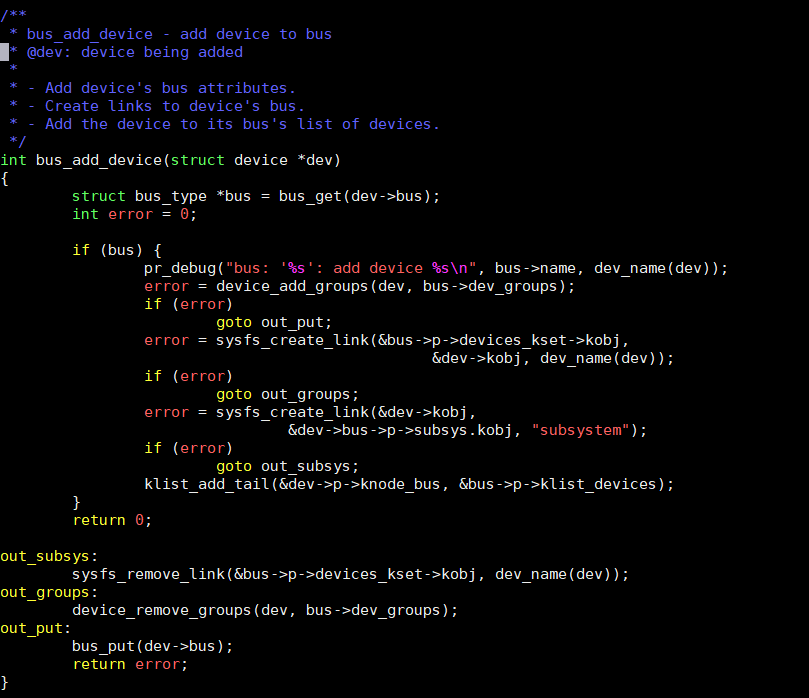
以下是 bus_add_device 函数的步骤解释,用更简单易懂的语言重新组织:
- 获取总线信息:先通过设备记录里的总线信息找到对应的总线类型。这个操作会增加总线的"使用计数",确保总线在设备添加过程中不会被系统回收。
- 检查总线有效性:确认找到的总线类型是否有效,如果无效则停止后续操作。
- 记录操作日志:打印调试信息,显示总线名称和设备名称,方便开发者跟踪设备添加过程。
- 添加设备属性:把设备添加到总线的属性组里。这些属性组会在系统文件系统(sysfs)中生成设备的配置文件,供用户查看或修改设备参数。
- 创建总线到设备的链接:在总线目录下创建一个指向设备文件的快捷方式。这样用户可以通过总线目录直接访问设备的配置信息。
- 创建设备到总线的链接:在设备目录下创建一个指向总线管理目录的快捷方式。这建立了设备与总线之间的双向关联,方便系统管理。
- 加入总线设备列表:把设备正式加入到总线管理的设备列表中。这样总线就能随时知道所有连接的设备,进行统一管理。
3、bus_probe_device 匹配
调用链路:
text
bus_probe_device
    └─> device_initial_probe
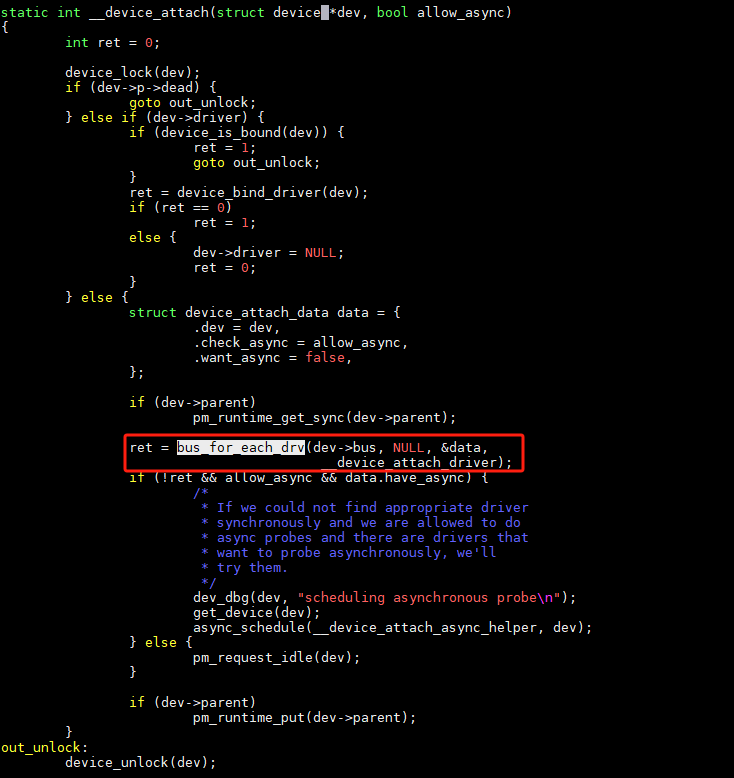
└─> __device_attach重点分析 __device_attach:
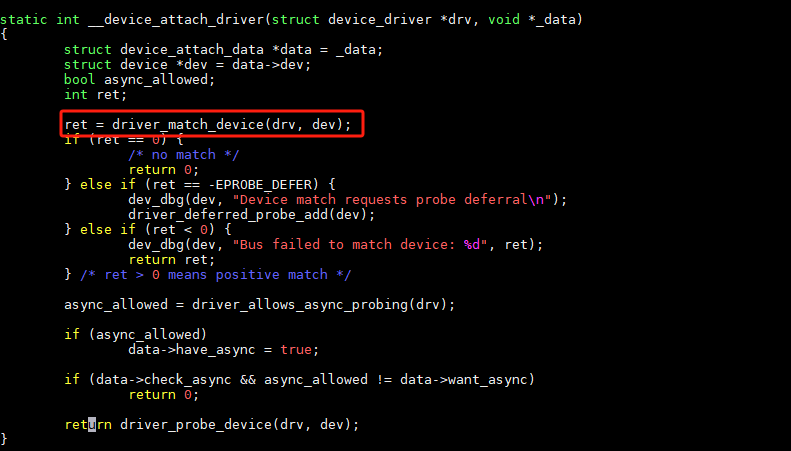
Bus 中 Match 的调用:

扫描: